
Apartment Complex Monument Guide: Everything You Need to Know
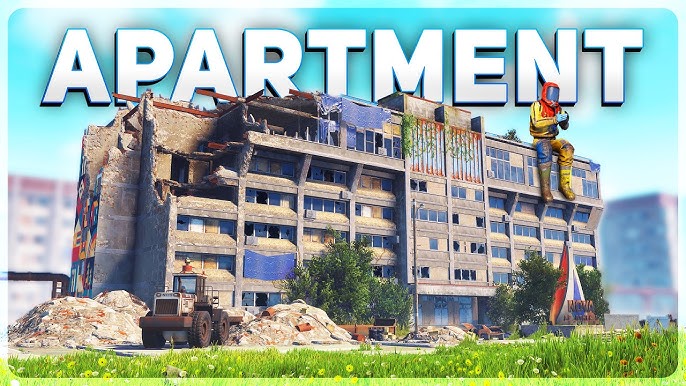
Releasing in the Common Ground Update on July 2nd, 2026, the Apartment Complex Monument is a massive safe-zone monument designed to temporarily house players in predesigned, rentable structures that cannot be raided by traditional means. They are, in the words of the developers, intended for short-term use or as a jump-off point to progress in a world set out to keep you on the beach.
This has been one of the most controversial points of discussion on the Staging Branch Discord in its history, so we will stick strictly to the facts as they are at the time of writing and avoid theories about system exploits and the like.
This guide provides detailed information about the Apartment Complex Monument, enabling you to quickly identify basic facts and to prepare for, access, and successfully utilize the monument, while offering insight into the various mechanics and pitfalls you may encounter.
Apartment Complex Monument Guide: Everything You Need to Know
Monument Overview
The Apartment Complex can really only be compared to two other monuments in both scale and utility: Outpost and Bandit Camp. It is a large safe zone that allows combat only within individual apartment rooms.
Because of the sheer scale of the monument, we will take a nonlinear, piecemeal approach to its features. Each section will be broken down individually, highlighting what is unique or otherwise significant about it, and each new subsystem introduced to the game will be covered in greater detail towards the end of the guide.
We will break down the parts by whether they’re indoors or outdoors to simplify the experience. The table of contents at the top should enable streamlined browsing to find more specific information.
Keep in mind moving forward that this isn’t really a lootable monument, though some small elements exist, like the occasional barrel or box, and one seemingly out of place diesel fuel spawn. We might mention it when we see it during our research, but this isn’t that type of monument.
Preparing for the Apartment Complex Monument
The Apartment Complex is less of an event or monument and more of a dwelling or shopping experience. The most important thing you need to bring to make the most of its amenities is Scrap. Everything here, except for what players are selling, costs Scrap to rent. Even after you rent something, you should expect to continue to pay for it at an hourly rate, similar to standard base upkeep. More on that later.
The Apartment Complex Monument
Exterior Areas
Underground Rail Network, Project R.U.S.T Statue & Barbeque
At the corner of the monument, between what we will call the Empty Building and the Partially Empty Building, we have both the entrance to your standard Underground Rail Network experience and a beautiful stone statue in front of it.
There isn’t much to say about the rail entrance, other than that it comes pre-generated with every Apartment Complex generation, so it’s reliably there all the time.
The statue, on the other hand, is a unique image created specifically for this monument. It has a plaque on the bottom and on either side that says “Project R.U.S.T.” We previously discovered means “Repopulation Unit Survical Test,” with a large double-helix DNA strand on top, in what appears to be some sort of metal. Aside from its visual appeal, the statue itself has no method of interaction.
Also nearby are two butted-together shipping containers with a peacekeeper turret on top, a good amount of assorted trash bags piled up and strewn about, and the monuments’ public Barbeque just in front of the large Empty Building, jumbled with some mattresses and a small glowing lantern.
Empty Building & RUST Mural
Not to quickly dismiss or overlook such a large portion of the monument, but this first large, empty building is just that. We assume that this could be given a purpose in the future, but it is completely hollow at the moment.
The back of the building, facing away from the monument, is capable of spawning a barrel or two, as is the front. There is a stationary school bus just out front that players can enter, but it doesn’t have a real function at this time.
The park benches in this area aren’t yet mountable, but little details like that were still being worked on at the time of this writing. The rest of this bit of the monument is mostly garbage cans, bags, broken-down vehicles, and dumpsters. There is a large, beautiful mural painted on the actual Apartment building that faces this section of the monument. Hopefully, they get those benches working.
Partially Empty Building & Rear Park
Now there is a perfectly good reason that we’re calling this building partially empty, and that is to say that we’re heavily understating the descriptor even now. Much like the previous Empty building, we’d say that the partially empty one is probably 90% hollow as well.
There are 3 entrances to it: 2 at the front near the Player-Rentable Shops and 1 at the back by the Park. In the interest of clarity, we will cover the shops section separately, as it will require a considerably more advanced introduction and explanation.
On the reverse back side of the building, we have the alternate rear entrance along with 3 partitioned park sections. Two of the sections have assorted equipment that players can use, such as a merry-go-round and swingsets, while the third looks like it might have been a volleyball court at one time.
Barrels can spawn in this area, but nothing of real substance is to be had other than a good time. Make sure you’re up to date on your tetanus shots before visiting; a lot of the amenities and decor are quite rusted.
Central Park
Like the other park area, there exists a monument-central standalone park that has its own sort of charm. It’s much less overgrown than the back park areas, and seemingly much better taken care of. It has the same basic park elements that can be sat on and played on, along with 2 public telephones within sand-kicking distance.
Main Building Side Mural
As promised, the other side of the main building has an identical, yet slightly mortared mural all the way up it. This is actually really close to our favorite part of the whole monument, at the top of the main building, where it has been shelled, but we’re going to include that with the Interior section, since it can only be accessed by going through the building or using a minicopter.
Main Building Backside
On the back side of the main building, we actually have an original advertisement for what the apartment complex was called before RUST happened to it. NOVA Apartments, going right along with other backstories that we’ve had come out about RUST in previous wipes. I doubt anyone will end up calling it that, but it’s a nice little callback nonetheless.
There isn’t much else but rubble on this side, aside from a mirrored set of triple double-hung doors that lead into the main building itself. But before we switch over to Interior, we have one last, huge mention.
Rentable Vending Shops
The rentable vending shops are the epicenter of the monument. Aside from renting an actual room, being able to spend Scrap to set up a standard Vending Machine, away from your base, away from your main loot (unless you’re staying in an apartment), is a great way to participate in game commerce without advertising to the world where you live.
The Basics
Let’s get some facts out of the way before we dive deeper into the process of opening, maintaining, advertising, and selling from a shop.
Players are only allowed a single Shopfront at a time, per Steam account.
There are 14 shops available on wipe, so you must wait for a vacancy if you don’t get one immediately.
Shops have their own upkeep, at a rate of 10 Scrap per real-world hour.
Shops require a 100 Scrap down payment to open.
Failure to maintain your shop for 24 hours results in its closure and the destruction of all your stored items.
Once a shop closes, either via the Close Shop option or through delinquency, it immediately goes back on the market for someone to rent.
Identifying Vacant and Rented Shops
Vacant shops, or shops available for rent, will appear closed and boarded up, without any neon signage and with a lease agreement posted on their front. You may initiate the rental process by pressing the E key when you see a Gear pop-up labeled Open Shop.
Rented shops, or those you are unable to rent yourself but could potentially purchase from, should display neon Open signs and similar advertisements, as shown here. They will also have a semi-noticable NPC vendor inside. Some appear standing, some sitting, but all are usually friendly.
You may initiate the standard purchasing process by pressing the E key when you see a Cart pop-up labeled Shop. Alternatively, you may hold the E key to open a Wheel Menu that varies depending on whether you are the current owner of that shop.
If You Own The Shop
Holding the E key in a shop you own will present you with its own unique Wheel Menu.
Close shop is a nuclear option that you only want to entertain if you no longer want to peddle your wares here. If it happens passively while you aren’t nearby because you haven’t paid your store’s upkeep, you immediately lose access to your store, and all of the objects inside disappear. If you do it willingly, items will be deposited into your inventory.
Selecting the shop option opens the standard Vending Machine shopping interface. You may purchase your own wares, but it might raise the question of why?
The Open Shop option opens the inventory management window, where you can add or remove items from your machine. This is the main section for updating your inventory or taking the sales you’ve made at the end of the day.
Clicking Administrate opens the backend, where a Vending Machine owner can set prices, monitor sales, determine whether the machine is accessible via Drone, and handle other tasks that might concern someone in the secondhand business.
Finally, every good business needs positive, effective advertising. In addition to the default open signs that come with renting a stall, there is also an interactive paintable sign on top. You may decorate it anyway you wish to bring in those sales, within the Terms of Service of the game and the rules of the server you frequent.
If You Don’t Own the Shop
Holding the E key in a shop you do not own will present you with a unique alternative Wheel Menu.
Open shops on a non-owned stall currently shows a non-functional option to buy out the existing owner’s shop at twice the introductory investment and twice the Scrap cost per hour. It’s the exact kind of scummy, underhanded business dealings that RUST needs, but it hadn’t been brought to full fruition when we were writing this on Staging Branch. Subject to change, we hope.
If you happen to have an Apartment Key, you may hold down E while it is in your hotbar and equipped to Break-In to a non-owned shop. At the end of 30 seconds, you will notice that the aforementioned mousewheel menu now has a new Open button, which allows you to pilfer all of the contents, both advertised and not, of said shop. You have 300 seconds by default to browse what you’d like to steal.
Interior Areas
Partially Empty Building
As glossed over earlier, the entrances to the Partially Empty building face both the main courtyard/shops area and the back playground area, for a total of 3 entrances. There isn’t anything of note inside this glorified passthrough other than some peacekeeper turrets and a building in desperate need of a glowup.
Main Apartment Complex Building
At last, we come to the content that you are looking for: affordable semi-aboveground housing. No sense in beating around the bush, although there are plenty of fake shrubs, natural invasive bushes and vines, and even a few cockroaches lurking inside.
The main Apartment Complex may be entered either from the previously mentioned backside of the building through any of those 3 doors, or their mirrored equivalent on the shop market side. There are no barriers to entry into the common areas, which we will go over individually, but player-owned rooms are not so easily breached.
First Floor – Check In
The check-in process is quite simple once you find the right NPC. We will go through almost the entire process below, including room abandonment, room upgrades, and most other options.
It all begins with I’m looking to rent a room.
What kind of room are you interested in? There are 3 room types available, each with its own unique amenities, costs, and degrees of spaciousness. As with any other choice in life, you do get what you pay for. At the end of the menu walkthrough section, we will detail each room individually to help you make the choice that is right for you.
Penthouse, Standard, or Basement. Another way to think about these is as Large, Medium, and Small. The down payment price is 400, 200, or 100 Scrap, depending on the size you choose.
At this moment, you are a room owner. The concierge should issue you a room number, and this should essentially end the pertinent dialogue required to get your first apartment.
New Menu Options
Once you’ve established residence, it is a good idea to talk to the NPC one more time and check out the new menu options.
What Room Am I Staying In Again?
This is just a quick, straightforward affirmation that you do indeed have a room, and which one it is. Rooms prefaced with a B indicate they are located in the basement.
How Do I Pay My Rent?
Instead of just telling you the number, the NPC will also tell you what type of apartment you have and where it is located (when applicable). The NPC will also inform you that if you fail to insert the necessary Scrap inside your room (there’s a wall slot right by your front door) in a timely manner (24 hours of ‘decay’), you will be evicted and your belongings deleted.
Losing a room in this way is the same as telling the NPC that you no longer need a room, and it won’t impact your ability to get a room in the future.
I Want to Upgrade My Room.
As I said, you can’t downgrade without abandoning your room and starting over. Upgrading costs the difference between the room you had and the new room you want, and the previous balance will roll over to cover that difference. Make sure that you empty your current room completely before upgrading, or risk losing everything inside your former dwelling.
I Don’t Need My Apartment Anymore. (Caution Advised)
If you no longer need the room, this is an option. You will be warned that you will lose any possessions left inside if you continue.
Repair Bench & Research Table
To the right of the Check In area, free-to-use public utility options are available to non-residents as well. Anyone may use the repair bench or the research table, regardless of tenant status.
Elevators & Mailboxes
Opposite the Repair and Research Tables are the elevators and the mailbox system. Any player may access the mailbox on the walls and leave a note. Only the occupant of the room may check the mailbox assigned to them. Elevators may also be used by anyone.
Stairwell
The stairwell is another common area that is accessible to anyone. It is a direct path to either the basement or the top floor.
Room Corridors
Essentially, all floor corridors have the same layout with minor visual alterations, except for the basement, which we will cover last. Each also has a separate service elevator at the end of its path, running from floor 6 down to the basement. These elevators and the corridors they occupy are pictured below.
The Basement
The basement is similar to all the other floors, with one major exception. Through its twisting halls, you will eventually come to a Bandit Camp-style guard, protecting a room that doesn’t match any other room in the building.
With a little greasing and 50 Scrap later, you may gain access to a quiet, dark little room with a Computer Station. Once the door is open, it will remain open for 300 seconds (5 minutes). Anyone may enter or exit during that time window. The guard isn’t all that enthused about his job. Additionally, he will sell you any number of Apartment (Master) Keys that may be used for a one time, one use access window of 300 seconds to any occupied apartment room or shop. Use with caution, as apartment rooms in particular are combat zones.
The Computer Station
Okay, so a Computer Station. What’s the big deal? Well, gentle reader, this Computer Station, as pictured below, shows a list of all rooms and shops in the complex and indicates which are actively occupied. More importantly, and sorta mentioned earlier in the shop guide, it also shows a secret, tabulated value for each room’s contents. Not all the specifics are fleshed out by the developers yet, but think of it this way.
It’s probably a very good bet that this information would be useful to someone who has the Apartment Key we mentioned earlier, which is a 1-time-use item purchased at in the basement of the Apartment Complex Monument that has no respawn cooldown window and costs a static 1000 scrap fee, thus you see now why the information that the laptop provides might be useful in the future.
Currently, with the key on your hotbar, you approach the occupied room or shop that you wish to burgle. Hold down the E key for 30 seconds, and gain access to the room (or shop inventory) and all its assorted storage for 5 minutes. After such time, if all is programmed correctly, you will be banished from the room or shop inventory and unable to re-enter without a new key.
The key is consumed on use. Pay very close attention to the last entry of this guide, regarding Combat Zones. Otherwise, you might be in for quite the surprise if the person is online.
The Roof, Helipad, and Parkour Course
The roof is more of a self-exploration area, where we’re gonna include a few quick snips, as well as the way up. As illustrated, if you’re at the elevators on the 6th-floor penthouses, there is a quick-access door and a ladder that lead straight up.
Once on top, we encourage you to check out the demolished portions. There are some hidden ladders and ropes, as well as a hidden room that the devs haven’t made accessible, presumably yet. Watch out for that edge, though… It’s a long way down.
Room Types
Each room type has its own basic aesthetic and baseline features, and overall reflects the financial investment the renter has made. Every room has a simple sleeping bag or a bed, though these aren’t differentiated in any way. Both come with a 10-minute respawn timer, regardless of type.
All rooms come with a preprogrammed, fully functional telephone. Each has a toilet for 100% comfort, ranging from a small red bucket to a lavish room with cabinetry and a loungeable bathtub. They all have some sort of sink, with drinkable water. It’s the little things that set them apart.
Below, we go through each room and explain how it differs from the one before it.
It is important to note that each room type has a specified amount of storage. Storage comes in all shapes and sizes and is hidden throughout each room, from kitchen cabinets to bathroom drawers.
One Last Thing – Combat Zone?
So if you read the bit above about The Big Deal, also known as the Apartment Key, then you’re aware that breaking and entering is a thing. You should also be aware that once you’re in your room, the safe zone turns off and the Combat Zone turns on. Now, players cannot just run in after you. You’re protected in that way.
But if someone happens to have a key, and you get targeted for theft, all rules are off.
Other players can enter for a term of 300 seconds (5 minutes)
They can steal your stuff and do you bodily harm
Fortunately, you can hurt them as well
This is a brand-new mechanic and highly susceptible to change. As it stands right now, it’s a very no-holds-barred scenario if you should come face to face with someone as either the robber or the robee. We will flesh this out as it becomes more concrete