
What is the RUST Clan System?
The RUST Clan System will be introduced in The Common Ground Update on July 2nd of 2026, alongside the release of the new Apartment Complex Monument. The main draw of this new system is that it allows the collective group to span multiple servers, with inter-clan recognition a reality, whereas the traditional Team System is limited to a single server.
Given that previous work on the Nexus System suggests cross-server migration may be available in the future, it makes sense that larger groups would need a means to branch out beyond a standard 8-12-person team interface while maintaining the same benefits as the traditional team interface. Look no further for the solution than the Clan System.
What is the RUST Clan System?
The body and mind of this system reside in the invention and incorporation of the Clan Table. This deploy-able acts essentially as the ‘Tool Cupboard‘ of the system, complete with its unique status marker and range. Would-be clan creators will require access to the table to create, name, and manage their organization, as well as other features covered below.
For player convenience, these tables have been added to both the Outpost and Bandit Camps to support early-game administration. The location for the Outpost table is in the barbed wire fence area, sharing its location with the research table, while the Bandit Camp location is just beside the staircase leading up to the gambling wheel. They are also craft-able by players, but must be researched first at a Work Bench Level 1.
Creating a Clan
Forming a clan is quite simple, given that you aren’t already a part of one. Start off by either opening a Clan Table while standing at it and pressing the E key on the MANAGE CLAN option, while under the nearby effect of a Clan Table, or while using the Clan tab at the top of your inventory screen. Players may also use the default button J to open the clan screen directly. If all criteria are met, you should see the above image.
Proceed by clicking the + CREATE A NEW CLAN button.
You should now see the image above, which prompts you to enter a clan tag in the provided box. All names should comply with the Terms of Service guidelines set by the game developer and/or local server administration. Double-check the name for typos before pressing the CREATE button, as once done, this cannot be undone. You will need to disband and completely remake any clan that is misnamed.
Congratulations, you are now the proud founder of (Your Clan Name Here)!
Inviting Players to Your RUST Clan
To invite members to the clan, do as you would to invite them to a team, with two notable exceptions: first, while facing the desired invitee, hold the E key, which will show a countdown timer of Invite to Clan for roughly 3 seconds. After around half a second, that player should have received an invite to the clan, and may accept it in their own Clan Overlay menu.
Second, the invite can neither be sent nor accepted when not under the effect of the Clan Table, indicated by a purple status bar near your vitals.
Note: Clans may only be disbanded when you are the last remaining member of one, and you elect to leave.
Clan Table Features
Once created, players should notice that each and every tab has the official clan banner (if created) on the left side of the interface, along with the name, member status (maximum 100), and a large LEAVE CLAN button at the very bottom. At the top center of the interface, tabs are available for a range of rank-dependent features.
Clan chat is an alternate feature that is currently server-exclusive and is accessed and used in the exact same way as Team Chat, only in magenta. It doesn’t currently span across servers.
Announcement
Available for all members to view, the announcement tab is slated to be a Message of the Day area where leadership can leave notes, post information, or anything else they can think to write. For those with permissions, simply click anywhere in the large text box within the Announcement tab, type your message, and press Cancel (to discard your message) or Save to cement it until it’s changed again.
Members
The members tab, once again viewable by anyone in the clan regardless of rank, serves as the Active Clan Roster. Here, members can view others with the same tag, and those with permissions can promote or demote lower-ranked members, add notes to their profiles, or remove them entirely, if permissions allow.
Changing Member Notes, Ranks, or Kicking Players
As a subsection of Members, those with permissions to do so will be able to change player notes, alter member ranks, or remove members from the clan from this same window by selecting the player from the Members list and using the corresponding buttons that appear with their name and avatar to make those decisions. When kicking a member, a warning notification will appear as shown.
Note: You cannot make changes to ranks or permissions when not within range of a Clan Table.
Invites
The invites tab is a current record of Invitations sent to non-members who have yet to accept. In addition to naming the invited player, it lists who the inviter was and the date and time the invitation was extended. Players may be invited by those within the clan with the appropriate permissions, as established in the Ranks section below.
Ranks
For the standard default member rank, the Ranks tab will show only the clan’s hierarchical structure. For those with permissions, this is the location to change that very hierarchy into whatever you’d like it to be.
Individual ranks may be changed to any acceptable name you’d like, and individuals may be promoted up or down within the structure. Ranks may be deleted entirely. At the bottom of the screen, new ranks may be created by adding the new rank title to the ‘Type new rank name…’ bar and pressing CREATE RANK.
Within each rank, an assortment of permissions may be given or revoked with a simple checkbox system, followed by either CANCEL or SAVE CHANGES. The following options are listed;
Set MOTD (Message of the Day)
This is the end-all metric for what members can do. If a member lacks permission in the Ranks tab, they will not be able to do anything beyond their current rank.
Score
Clans within a server will be automatically pitted against one another on a Leaderboard, available from the clan interface in the top left, indicated by *LEADERBOARD. Aside from bragging rights, there are no benefits to gaining these points. Clans passively gain (or lose) points by doing events of interest. At the time of writing, these events are:
Destroying BradleyAPC – 10 points positive
Destroying Tool Cupboards – 10 points positive or negative, if yours is destroyed
Hacking locked crates – 10 points positive
Killing players in opposing clans – 10 points positive
Being killed by players of opposing clans – 10 points negative
Killing unarmed players – 10 points negative
Looting Elite Crates – 10 points positive
Opening Hacked Crates – 10 points positive
Reaching Cargoship – 10 points positive
Running Excavator – 10 points gained for every diesel ran by the clan that turned it on
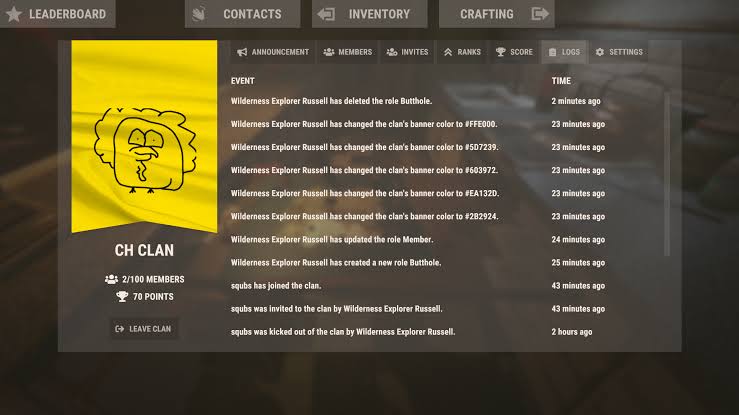
Logs
Logs are a detailed audit listing of every actionable event that has occurred and been recorded within the clan interface. Invites, promotions, demotions, all the way back to the formation of the clan itself – you will find a full listing here, permissions pending. Currently, this log cannot be altered or deleted.
Settings
The settings section is a two-part graphical interface system for both flying clan colors and creating a custom graphic that overlays on top of said colors. Currently, there are 8 colors to choose from by default, but once you enter the logo editor via the large EDIT LOGO button, players are free to express their creative freedom as they would on a standard sign or canvas.
Implication and Differentiation
While the RUST world waits for the full Nexus system launch, there are a few differences to note between the default Team system and the new Clan System. First and foremost, so long as you are on the same server, Clans DO NOT wipe after a map wipe. Both systems remain relatively independent of one another, but there are overlaps worth noting.
Player nameplates are probably the first thing that you will notice, with those in clan but not on team appearing instead with a Magenta text, both in the world and on the map. Those just on the team will appear as they always have, in bright neon green, and those both in the clan and on the team will appear in neon green, with the clan name below their player name.
rust clan mod