Looking to jump straight into the action without spending hours hitting trees with a rock? Joining a “Start with Gun” modded Rust server is one of the best ways to practice pvp, test weapons, and enjoy fast-paced gameplay.
Follow this quick step-by-step guide to locate and connect to the server in under a minute.
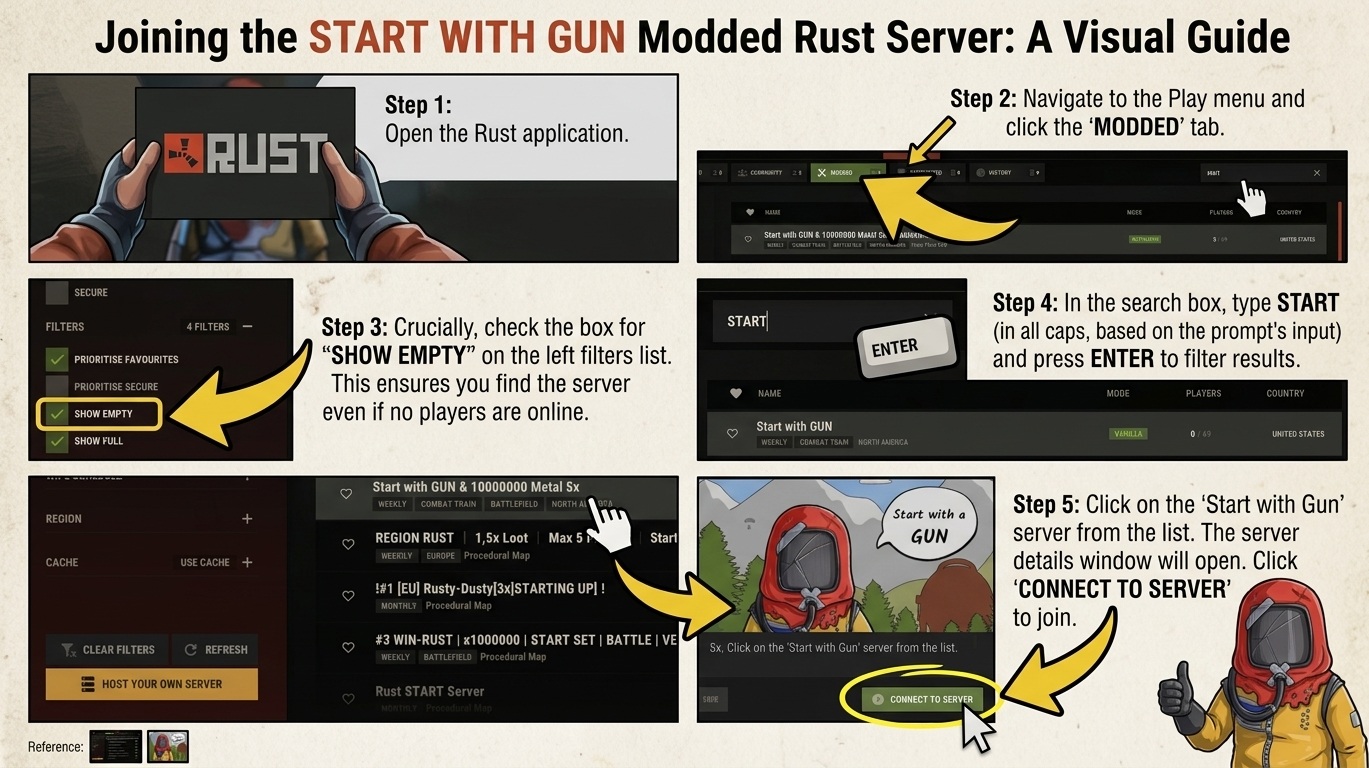
Step 1: Launch Rust & Open the Server Browser
Start by opening the Rust application on your PC. From the main menu, click on PLAY at the top bar, then navigate to the MODDED tab to view custom community servers.
Step 2: Enable “Show Empty” in Filters
On the left sidebar under the FILTERS section, make sure to check the box next to SHOW EMPTY.
Tip: Modded servers can occasionally drop to zero active players during off-peak hours or right after a wipe. Enabling this filter ensures the server appears in your search results regardless of player count.
Step 3: Search for the Server
Click on the search box in the top-right corner, type START, and press Enter.
Step 4: Select the Server
Look through the filtered list for “Start with GUN & 10000000 Metal 5x|Zombies|Kits|Small|420|event” (or your targeted “Start with Gun” server) and click on it to open the server details window.
Step 5: Connect to the Server
Review the server information pop-up (which details plugins like kits, skinbox, minicopters, and blueprints). Click the green CONNECT TO SERVER button at the bottom right to join the game!