
Discover Hidden Treasures with the Metal Detection System
The Metal Detection System was added to RUST in February of 2024 as a part of the Bags to Riches Update, acting as a new type of minigame within the game as an alternate means of loot acquisition. It is important to note that since this system is still in development and in the early stages of release, portions of this guide are subject to change.
This guide details how to use the Metal Detection System and the related tools for finding buried treasures and loot in RUST.
System Overview
Similar to the real-world concept of metal detecting in an outdoor environment, the system in RUST is roughly identical. Players with the appropriate equipment may venture into the wild to detect a randomly spawning Metal-Rich Zone (MRZ).
Once players discover an MRZ, they may use the instrumentation more methodically and slowly to find a Dig Site. Each MRZ detected should have 1-4 Dig Sites within an invisible 15-meter square area. Players then hone in on buried metal signals using visual and auditory cues from their Metal Detector until a flag is placed, and they may use any melee tool to retrieve the buried loot. These are the only things necessary to carry out this minigame activity.
Searching for Metal Rich Zones
Before setting out to find buried treasure, it is important to understand the scope of the challenge before you. First, we should lay out some ground rules about where MRZs can exist within the world and what unknown variables might impact your ability to retrieve the loot.
Biomes
Long story short, the biome that you are searching in absolutely matters. The Temperate and Desert biomes are the perfect locations to begin your treasure hunt. Unfortunately, the Arctic Biome was left out in the cold. MRZs cannot at this time spawn in any area covered in snowfall or very close to it. A commit to include the tundra was made by the developers, but it appears it wasn’t incorporated into the live version of the game.
Monuments
Often in RUST, especially during our primitive stage, we think of monuments and their boundaries regarding how close we can get without radiation being a factor. This game mechanic also has a similar influence on the Metal Detection System.
MRZs can spawn right up to the point that players without proper radiation protection would be able to get, and in some cases, even closer. At this time, MRZs and Dig Sites cannot exist inside the monument’s boundaries.
Roads
So what about the open road? Dirt roads are much simpler and absolutely no problem when it comes to detecting and digging up treasure, as they are very much on the same plateau height-wise as the landscape.
Concrete and Ring Roads, however, are slightly more elevated. Yes, MRZs and Dig Sites can spawn directly on top of roads, and in some cases, players might need to crouch while detecting to get a flag to place. In some spots, this may not be possible.
Safe zones
Safe zones originally had MRZs come almost into the monument, but as of the April 2024 Update, the Metal Detector could no longer be used in safe zones.
Other Considerations
For thoroughness’s sake, we aimed to test every environment in which one could check for buried treasure. While treasure could spawn on beaches, it seemed to deviate away from the water completely. The same goes for rivers and other bodies of water. We did have one flag spawn quite close to an inland water basin, but the flag remained firmly on land.
For a good metric, we tested 46 caves on nine different maps. None had any indicator of loot present belowground, with only 2 having it above ground. We attempted to search for treasure deep underwater near sunken ships and rock formations, but none existed with this system.
The Process for Finding MRZs in RUST
Once you gather all of your necessary tools and provisions and you’ve decided to leave the base and track down the treasure, we should probably educate ourselves on how this ‘sophisticated’ technology works.
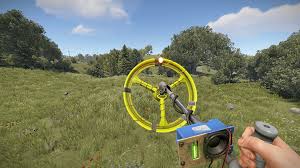
Start by adding the Metal Detector and melee tool to your hotbar and equipping the detector. The Metal Detector is automatically turned on when it enters the player’s hands. The likelihood that it will immediately begin sounding auditory and visual cues is slim but not out of the realm of possibility.
By default, 1200 MRZs should exist within a roughly 7×7 map squared area. Server admins can change this value with a server convar, found at the end of this guide.
With the Metal Detector in hand, we must run, horse, or fly around until we get some indication of an MRZ being present by our instrumentation. At first, the machine will sound with a single faint blip noise, and the red indicator light atop the business end of the metal detector will light up once. We are near an MRZ.
Slowly inch forward, with the goal being additional blips and the lights on the left side of the control panel of the Metal Detector starting to line up green. Players should not be using (hold the right mouse button down) during this stage.
Walk in semi-circles to pinpoint in which direction the treasure could be. This is further indicated by more lights turning green and the frequency of the auditory blip increasing.
Once we have filled all the green lights, it is time to hold the right mouse button and click down to enter a forced-walk ADS (aim down sight). All focus should now be on filling the right red lights while maintaining a full green light bar. If green lights start to fade, stop your walking direction and adjust to a different one.
When all green and all red lights are illuminated simultaneously, hold fast with the right mouse button still held down for roughly one second. At first, a small blue flag should appear at your feet, turning into a solid red flag after this short period. Bingo. Be aware, though, that other players can also see these flags!
How to Dig Up Buried Loot
Once the red flag appears, the only thing left to do is uncover our buried treasure. Swap from the Metal Detector to your melee tool of choice. Using your attack key (left click by default), give the small red flag three quick taps with the tool. This will cause the flag to despawn, and whatever loot was buried beneath it will quickly spring to the surface. The images below depict the Shovel tool slated to make its way into the game.
Per how the metal rich zones work, there is a reasonable likelihood of other dig sites around this flag. Once you have dug up your loot, recheck the Metal Detector to see if further loot is in the area. It will not light up at all if this MRZ is exhausted.
While the complete list of possible items retrievable through this system has yet to be published, below is a small sampling of what we recovered during the end week of Staging. Location matters, as different biomes will produce different resources and loot