
What is RUST Boat Building?
The RUST Player-Made Boat Building System (PMBBS) is an independent aquatic building mechanism that allows players to create floating bases or mobile forward operating platforms on the ocean. Much like the default base-building system and the Electrical and Farming systems, the PMBSS introduces various components and subsystems. These subsystems have their own rules and guidelines to manage something so vast that its deployment on live servers has been delayed longer than any other system in recent memory.
Unlike the land-based building system, the PMBBS has a few additional rules and nuances due to its liquid foundations. Instead of having full reign to build as large as one would like on land, players are limited to a small ‘sandbox’ roughly 5 square by 11 squares in diameter.
What is a RUST Player-Made Boat, and What’s it Used For?
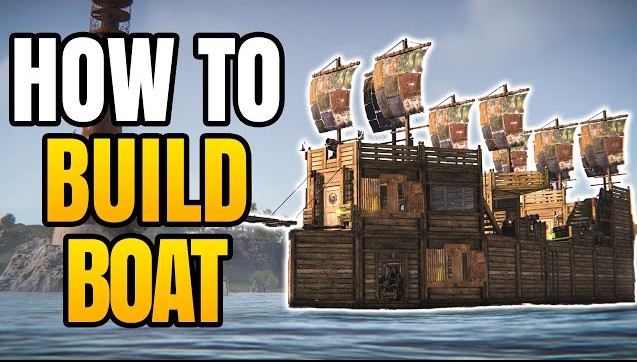
A player-made boat, at its core, could be seen as a potentially “more secure Tugboat” with more customization options. These player-made boats can be used as floating, securable, and movable bases, enabling players to take to the seas and perform various operations, from crafting, storing, and hauling loot to raiding and more. While electrical and automation are not supported on Player-Made Boats, being able to make something considerably larger than a Tugboat has other advantages.
Modular Boat Authorization System
The Tool Cupboard item is not used on Player-Made Boats, as they function similarly to Tugboats. The authorization system is controlled by the Steering Wheel, and the boat’s builder primarily controls this function. To gain authorization for a Player-Made Boat, the Steering Wheel must be placed and unlocked. For doors placed on the vessel, authorizations after the fact are performed as any other door in-game is, via Code or Keylock rules.
After keycode authorization is established, aside from using the Steering Wheel to maneuver, the only menu wheel options that remain are:
Clear Authorized List
Deauthorize
Boat System Components
In total, 9 Boat System-specific items are available, and can be found in greater detail in our RUST Item Database. You will find short synopses below.
Once you’ve learned and crafted your Boat Building Station, players may equip it in their toolbar like any other tool. It presents the player with what appears to be a square building platform with a built-in box and umbrella, which is visible only above the ocean floor. For this to work, we have to head to the sea; no other type of water will do.
The ocean floor texture will detect and allow a Boat Building Station platform to be placed above it, but even then, it is contingent on the distance between that texture and the water surface.
These boats require quite a bit of underwater room to maneuver, and figuring out a way to cheat the system and build in a shallow will make your finalized boat pretty useless after the fact. For this reason, we recommend selecting a wide-open, deep part of the ocean (no nearby bases with active Tool Cupboards) to begin assembly.
Boat Building Plan
The Boat Building Plan is the central aquatic boat building tool in RUST. Having a Boat Building Plan equipped gives you access to boat building options when you hold the Right Mouse Button while within the bounds of a Boat Building Station.
Wood is currently the only building material used in boat construction and has a unique appearance, similar to upgraded wood. Low Grade Fuel will also be required to place pieces.
Just like building on land, ‘foundational’ pieces, in this case referred to as Hulls, are required to be put down first so that other things like walls and frames may be placed on top of them. This provides the same stability system as you’ve seen before, but in a water-based environment.
When deployed on a customizable modular boat, it provides passive, free propulsion as long as it is set to its lowered position (toggleable by viewing the sail and raising/lowering it).
Players are only limited by hull size, and additional sails increase the power-to-mass ratio, allowing for better acceleration.
Small Boat Engine
When deployed on a customizable modular boat, it provides propulsion so long as it is loaded with Low Grade Fuel and turned on (by pressing E on the deployed engine).
Players are only limited by hull size, and additional Small Boat Engines increase the power-to-mass ratio, allowing for better acceleration. Each will require its own fuel and its own activation.
Steering Wheel (Helm)
When deployed on a customizable modular boat, it allows directional changes while the vehicle is in transit. There is a navigational arrow on the wheel itself that indicates the direction the boat will go when pointed.
Interactions with this device involve mounting by pressing the E key, locking the boat authorization by holding E, selecting lock, entering a code, and editing the boat’s composition when within the bounds of a Boat Building Station. Cannon
When deployed from the side of a customizable modular boat, it can be mounted, aimed, and fired at anything one wishes. The Cannon can accidentally hit the ship it is attached to, and cause considerable damage to the vessel and crew. It exclusively fires Cannonballs.
Controls:
Hold W, A, S, D, or use mouse movements to aim and direct the attackW up
A left
S right
D down
Once aimed, hold R to prime
Press the Left Mouse Button to fire
Anchor
When deployed off the side of a customizable modular boat, it stops or greatly reduces all forms of propulsion that might otherwise move the ship, including drift.
When deployed off the side of a customizable modular boat, it allows a gap to be crossed between the boat and any other structure or land without taking a dip. It is the shorter of the two side-vessel deployables of its type, the other being the Small Ramp. Unlike the Small Ramp, the Plank does not retract.
When deployed off the side of a customizable modular boat, it allows a gap to be crossed between the boat and any other structure or land without taking a dip. It is the longer of the two side-vessel deployables of its type, the other being the Plank. Unlike the Plank, the Small Ramp can be retracted by looking at it and pressing the E key.
Boat System Hulls and Walls
Now that we’re into the actual construction phase (editing), we will highlight each individual Boat Building Plan feature. Keep in mind that the Hull portions are the ocean equivalent of a land Foundation.
Standard square foundational type. May have other triangle or square hulls attached horizontally, or Walls, Doorways, Windows, Boat Stairs, Low, Low Cannon, and Low Barrier Walls built directly on top of it.
Standard triangle foundational type. May have other triangle or square hulls attached horizontally, or Walls, Doorways, Windows, Boat Stairs, Low, Low Cannon, and Low Barrier Walls built directly on top of it.
May act as either a first-floor roof or a second-floor floor. May not be placed off of Hull pieces.
May act as either a first-floor roof frame or a second-floor floor frame. Acts as the foundational support for a Ladder Hatch. May not be placed off of Hull pieces.
May act as either a first-floor triangular roof or a second-floor triangular floor. May not be placed off of Hull pieces.
May act as either a first-floor triangle roof frame or a second-floor triangle floor frame. Acts as the foundational support for a Triangle Ladder Hatch. May not be placed off of Hull pieces.
Internal and external-facing structural support for all layers above it. No gaps or spaces from which to attack through it.
Internal and external-facing structural support for all layers above it, offering a single-door space that may be filled with any door of its shape.
Internal and external-facing structural support for all layers above it, offering a window-shaped opening through which you may shoot or be shot at. Can fit any mainland window covering.
Non-decorative wooden low wall used as a solid obstruction for small arms fire.
Non-decorative wooden low wall with a modified structure to fit a cannon.
Decorative wooden low wall with notched slits, which may be fired from and through.
Standard treaded stairway leading from floor 1 to floor 2 and so on.
How to Get Started with the RUST Player-Made Boat System
The RUST Player-Made Boat System is relatively intuitive if you’re already equipped with knowledge about the mainland building system. There are subtle nuances, particularly regarding the addition of optional features and the construction of new components, which will be discussed below.
In addition to the nuances, there are rules players should know when building their first modular boat to avoid future hassle. Of course, there is more to add here, especially as patches and changes are applied, but we believe these are among the most important.
During the editing construction phase, a Hammer may be used to demolish a building piece that has been placed or misplaced, as could be done with authorization on land, with the same 10-minute timer. After that, removal options include physically chopping a piece out or using the Boat Building Stations Clear Building Area function, which will wipe the entire project. No Refunds.
No more than a single Steering Wheel may be deployed at a time, per ship. This is arguably the most important part of the ship.
All pieces come together to form the sum of their parts. If your boat is constructed of 8 pieces, totaling 600 health, then when deployed and finished, your boat will have 600 health and the equivalent mass for each piece.
Boat accessory items cannot be added outside the editing phase. This phase may be re-entered by positioning your boat back within the netted boundary of a Boat Building Station, then dismounting and selecting Edit Boat from the Station menu. The boat will then enter a state of suspended animation, even with the engines running or the sails down, and you may edit as you did before.
We have constructed the following 3×3 semi-2-story modular boat. Given its specifications, the number of parts and pieces, and the modes of propulsion we’ve selected, it would have the following statistics.
Unlike land bases, where each individual portion is its own segregated health unit, the entirety of a floating base contributes to the whole. If one portion is constantly bombarded, the whole ship shares in that damage once out of Editing. This is all still very much a work in progress, so this could change in the future.
With all this prefaced, gather your Wood and Low Grade Fuel, your plan, your station, and head out to a suitable depth of ocean. Deploy your Boat Building Station and start building.
Remember, you aren’t reimbursed for anything that gets damaged, deleted, or otherwise broken during construction. Abide by the lessons above, and happy boating.
Boat Acceleration, Navigation, and Repairs
Acceleration
As shown above, there are two primary modes of increasing the speed of your ship; Sails and Small Boat Engines. Either mode only affects propulsion when in its On mode, whether that be Sails lowered or the Small Engine powered and on.
To determine the overall speed that a vessel travels, the game takes the above-listed Power component, 2500 for Sails and 10000 for Engines when active, and adds all applicable modes together. If you had 10 engines, that’s 100000 power.
This number is then divided by the Mass of the total boat, so in our case, we’re running 2 sails for 5000 power. Our total mass is 4100, yielding a Power-to-Mass ratio of 1.22.
What does this number mean? Consider that a baseline P/M ratio of 1 means no movement. If we were upside down on this number, say 0.85, our boat would not move.
Inversely, anything over 1.0 will start to nudge forward (or backward if your Small Engine is set to reverse). This means that the more Power we generate, the greater our potential for acceleration. If in doubt, add more propulsion devices.
Navigation
Directing the boat is an already known quantity, with every RHIB and Rowboat you’ve piloted adding to your collective experience. Just to be safe, here are those controls again.
Captain Controls:
Approach the Steering Wheel and press E to mount
Acceleration is determined by engines and sails
Hold A to bear left
Hold S to bear right
Use the Arrow on top of the wheel to determine directionality
Dismount by pressing Spacebar and move to deactivate your propulsion systems, or activate your Anchor to stop
Repairs
Boats can be repaired using your standard Hammer to hit the damaged objects. It requires you to have Wood and Low Grade Fuel in your inventory.
As a good point of reference, a single torpedo launched from a submarine does 75 damage. If you have a Player-Made Boat with a total health of 750, that’s 10 hits. And because these boat types dip so low into the water, they’re practically impossible to miss for a surfaced sub pilot.
Decay
The boat will begin to decay if left outside and unattended. This begins after 1440 minutes without player interaction and takes 720 total minutes to break down. At present, non-wooden deployables, such as metal doors and windows, appear to decay at standard rates over time. Not sure if they’re going to change that, or if there is a method exists which would allow them to.
Items that CAN be placed on Player-Made Boats in RUST include:
Construction
Armored Door
Code Lock
Concrete Barricade
Door Closer
Factory Door
Key Lock
Ladder Hatch
Paintable Window
Reinforced Glass Window
Sandbag Barricade
Sheet Metal Door
Wooden Door
Wooden Ladder / Both hatch types
Wood Shutters
Item
All comfort figurines (pookies, balloons, plushies)
All Workbench types
Barbeque
Bed
Camp Fire
Chair
Chippy Arcade Game
Christmas Door Wreath
Christmas Lights
Clan Table
Clothing Mannequin
Dragon Door Knocker
Drone
Easter Door Wreath
Furnace
Hobo Barrel
Ice Throne
Lantern
Large Wood Box and all barrel / skinned box varieties
Locker
Mixing Table
Repair Bench
Research Table
Rug
Rug Bear Skin
Salvaged Shelves and bamboo varieties
Secret Lab Chair
Skull Door Knocker
Skull Fire Pit
Sleeping Bag and all Bed / Towel varieties
Small Stocking
Small Wooden Sign
Sofa
Sofa-Pattern
Spinning Wheel
SUPER Stocking
Table
Tuna Can Lamp
Water Purifier
Wood Storage Box
Traps
Flame Turret
Shotgun Trap
Small Spike Trap
Misc
Spooky Speaker
Strobe Light
Electrical
AND Switch
Audio Alarm
Blocker
All Industrial Light Colors
Bulb String Lights
Button
Chandelier
Command Block
Computer Station
Counter
Deluxe Christmas Lights
Digital Clock
Electric Furnace
Electric Heater
Electric Table Lamp
Electrical Branch
Fairy Lights
Flasher Light
Fluid Combiner
Fluid Splitter
Fluid Switch & Pump
Fridge
HBHF Sensor
Igniter
Industrial Combiner
Industrial Conveyor
Industrial Crafter
Industrial Splitter
All Neon Light types
All Battery Types
Large Solar Panel
Laser Detector
Memory Cell
Mini Fridge
OR Switch
Both Reactive Target Types
Powered Water Purifier
Pressure Pad
RAND Switch
RF Broadcaster
RF Receiver
Root Combiner
Search Light
Simple Light
Siren Light
Small Generator
Smart Alarm
Smart Switch
Splitter
Spot Light
Sprinkler
Storage Adapter
Storage Monitor
Switch
Tesla Coil
Test Generator
Timer
Tripod Spot Light
Twitch Rivals Desk
XOR Switch
Fun
ALL Fireworks
Beach Chair
Beach Parasol
Beach Table
Beach Towel
Boom Box
Connected Speaker
Disco Ball
Disco Floor
Junkyard Drum Kit
Laser Light
Microphone Stand
Skull Trophy
Sound Light
Telephone
Wheelbarrow Piano
Xylobone
build god mode boat